What shipped in each Flow release. Download the latest from the home page; Flow auto-updates after that.
v0.1.13
Release checks
The release process now puts version changes through a reviewed pull request before publication.
—Release checks validate main before a release tag is created.
—This release includes the Jira, MCP setup, and focus timer fixes from v0.1.12.
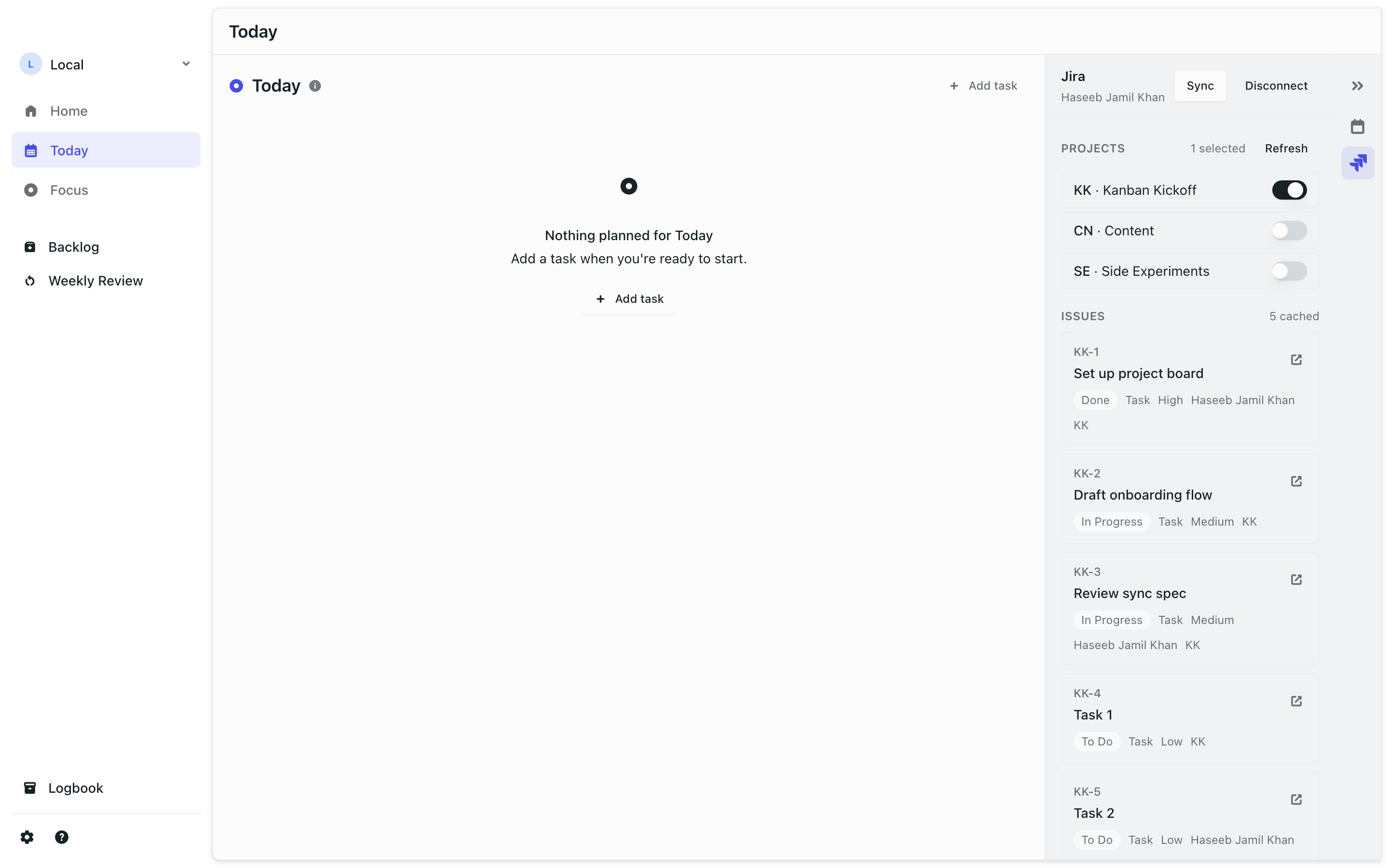
Jira panel preview with example data. Also included in v0.1.12.
v0.1.12
Jira issues, easier AI setup, and a steadier focus timer
Flow can read Jira issues, AI clients can connect with less setup, and focus sessions now track elapsed time more reliably.
—Read Jira Cloud issues in Flow, with the API token stored in the macOS Keychain.
—Select Jira projects and cache up to 75 recent issues. Drag an issue into a day or the backlog to create a linked local task; Flow does not write to Jira.
—Copy MCP configuration for multiple AI clients from Settings. Flow checks for Node.js and tests the connection, with keyboard tabs for setup.
—The focus timer uses a backend clock and ignores delayed replies after you stop a session.
—Jira discards outdated requests after you switch accounts.
Jira panel preview with example data.
v0.1.11
Keyboard navigation, and lists you can tell apart
Arrow keys move through every task list the way they do in Things, lists get their own colour and a # marker, and a layout bug that mangled task titles is fixed.
—Arrow keys move through any task list, moving the selection and the focus ring together — Enter opens, Space completes, D expands notes.
—Every list now has its own colour from a set of nine, and shows as "# name" wherever it appears. Existing lists were all the same purple.
—Fixed task titles collapsing to one word per line on cards that carried a list, notes or subtasks.
—Task detail and Quick Add no longer accept a double submit, and ⌘S / ⌘Enter save and close.
—The update notice now tells you what a release contains instead of only its version number.
v0.1.10
Task redesign, two-way MCP, in-app feedback
The task system grows lists and areas, AI assistants can now read and write tasks over MCP with one-click install, and feedback ships from inside the app.
—Tasks reorganised around lists and areas, with a redesigned task editor.
—The Flow MCP server is now two-way: assistants can read your tasks as well as create them, with a one-click install from Settings and docs at /mcp.
—Send feedback without leaving Flow — a small form in Settings delivers straight to us.
—Focus sessions get a calmer light 'aurora' surface.
—Repo and release hygiene passes behind the scenes.
v0.1.9
Inbound MCP, calendar drag everywhere, Material icons
AI assistants can push tasks into Flow, real Google Calendar events can be dragged and moved, and the whole app moves to a crisper icon set.
—First MCP channel: an AI assistant on your Mac can create Flow tasks locally — nothing leaves your machine.
—Drag and move real Google Calendar events on the timeline; duplicates from multi-day and all-day events are gone.
—Start a focus session directly from a scheduled task.
—Calendar sync now shows a proper loading state instead of a silent stall.
—New Material Symbols icon set across the app, self-hosted and subset to 57 KB.
v0.1.8
Calendar write-back
Scheduling stops being one-way: drag a task onto the calendar and it lands in Google Calendar too.
—Drag a Flow task onto the timeline and a matching event is created in your Google Calendar.
—Tasks now carry a real scheduled date and time under the hood, replacing the old 'today' bucket.
—Backlog columns share the same lane system as the week board, so scheduling behaves consistently everywhere.
v0.1.7
Silent updates and a calmer task list
Flow updates itself in the background, and the task list gets a top-to-bottom pass on typography, spacing and scheduling controls.
—Updates install silently in the background, with a small toast in the corner when a new version is ready.
—Task rows unify into one component with a native, quieter look — completion now flashes and settles instead of celebrating.
—Dense list rows tighten to a proper 13px type step rather than a one-off size.
—A new time picker replaces the native macOS control, so scheduling matches the rest of the app.
—Date pickers no longer close themselves when opened inside a dialog.
—Completed tasks stay visible on the weekly board instead of vanishing on tick.
—Overlays respect the system Reduce Motion setting.
v0.1.6
Command palette and calendar drag
⌘K arrives, and dragging on the calendar works again.
—Global ⌘K command palette for jumping around the app.
—Calendar drag interactions restored, and Home is live again.
—The old week planner is parked behind a flag while the lane system takes over.
—A batch of small interface fixes across the app.
v0.1.5
The glass pass
Flow's visual language lands: translucent surfaces, a reworked sidebar, and a focus session that feels finished.
—Translucent, blurred sidebar, dropdowns and popovers over a unified dark tint.
—Sidebar reordered, with a help and settings row and a profile dropdown that shows your Google avatar.
—The theme setting can now follow the system.
—Focus sessions gain an intention field, a proper stop control, and a guard against losing a session by accident.
—Flow reopens on the view you left, defaulting to Today.
—Fixed the transparent window and top-bar drag region that had regressed.
v0.1.4
Updater proxy
The auto-updater now checks flowlane.tech instead of talking to GitHub directly.
—Update checks route through the flowlane.tech proxy, so release hosting can move without breaking installed copies.
v0.1.3
Sign-in, auto-update, and installable builds
The first release that can sign you in and then keep itself up to date.
—Google sign-in on the desktop app, via a local loopback OAuth flow.
—The auto-updater loop closes end to end: Flow can find, download and install its own updates.
—Builds are mirrored to the public flow-releases repo, so the .dmg is actually downloadable.
—Bundles are ad-hoc codesigned, clearing the macOS "app is damaged" error on first open.
—Fixed a blank screen on launch caused by eager Supabase initialisation.